JSON Viewer
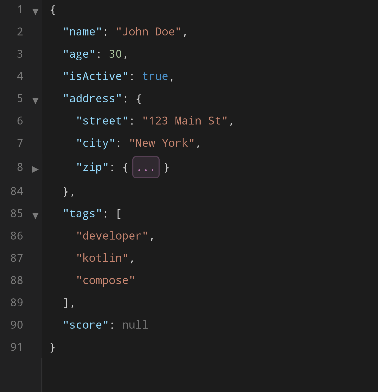
JsonViewerCMP renders JSON as a read-only, syntax-highlighted tree with line numbers, code folding, and virtualized rendering.
Size Limits
- Virtually no size limit. The viewer uses virtualized rendering to handle large documents efficiently.
Syntax Highlighting
Each JSON token type is rendered in a distinct color:
- Keys — object property names
- Strings — string values
- Numbers — numeric values
- Booleans —
true/false - Null —
nullvalues - Punctuation — braces, brackets, colons, commas
Code Folding
Objects and arrays can be collapsed by clicking the fold indicator in the gutter. Collapsed sections show an ellipsis with the element count.
Line Numbers
Line numbers are displayed in a gutter column with a subtle border separator.
Search Highlighting
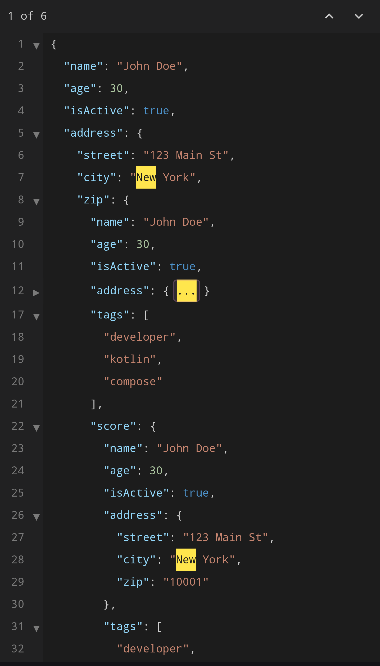
Pass a searchQuery to highlight matching text across the document:
Matches are highlighted with the highlight and highlightFg colors from the active theme.
Nested Scrolling
JsonViewerCMP uses LazyColumn internally for virtualized rendering. If you place it inside a vertically scrollable parent (e.g. Column with verticalScroll, or another LazyColumn), you must give JsonViewerCMP a bounded height (e.g. Modifier.height(400.dp) or Modifier.weight(1f)) and handle nested scroll coordination on the client side using Compose's nestedScroll modifier.
// Example: viewer inside a scrollable Column
Column(Modifier.verticalScroll(rememberScrollState())) {
    Text("Header")

    // Give the viewer a fixed height so LazyColumn can measure
    JsonViewerCMP(
        modifier = Modifier.fillMaxWidth().height(500.dp),
        state = state,
    )

    Text("Footer")
}
Reactive State
The viewer responds to changes in the json parameter passed to rememberJsonViewerState — new values trigger a re-parse and update the display: